Cover Letter Format: Examples & Tips

Learn how to format a cover letter with professional examples and actionable tips for crafting a polished letter that stands out to employers.
As seen in:◆ Foot Note





A well-formatted cover letter is key to making a strong first impression. Using a clear, organized structure and strategic design elements helps you effectively highlight your qualifications.
In this guide, we’ll walk through the proper cover letter format, show you what to include in each section, and provide examples and tips to help you craft a high-impact letter that wins interviews.
Table of Contents
How to Format a Cover Letter
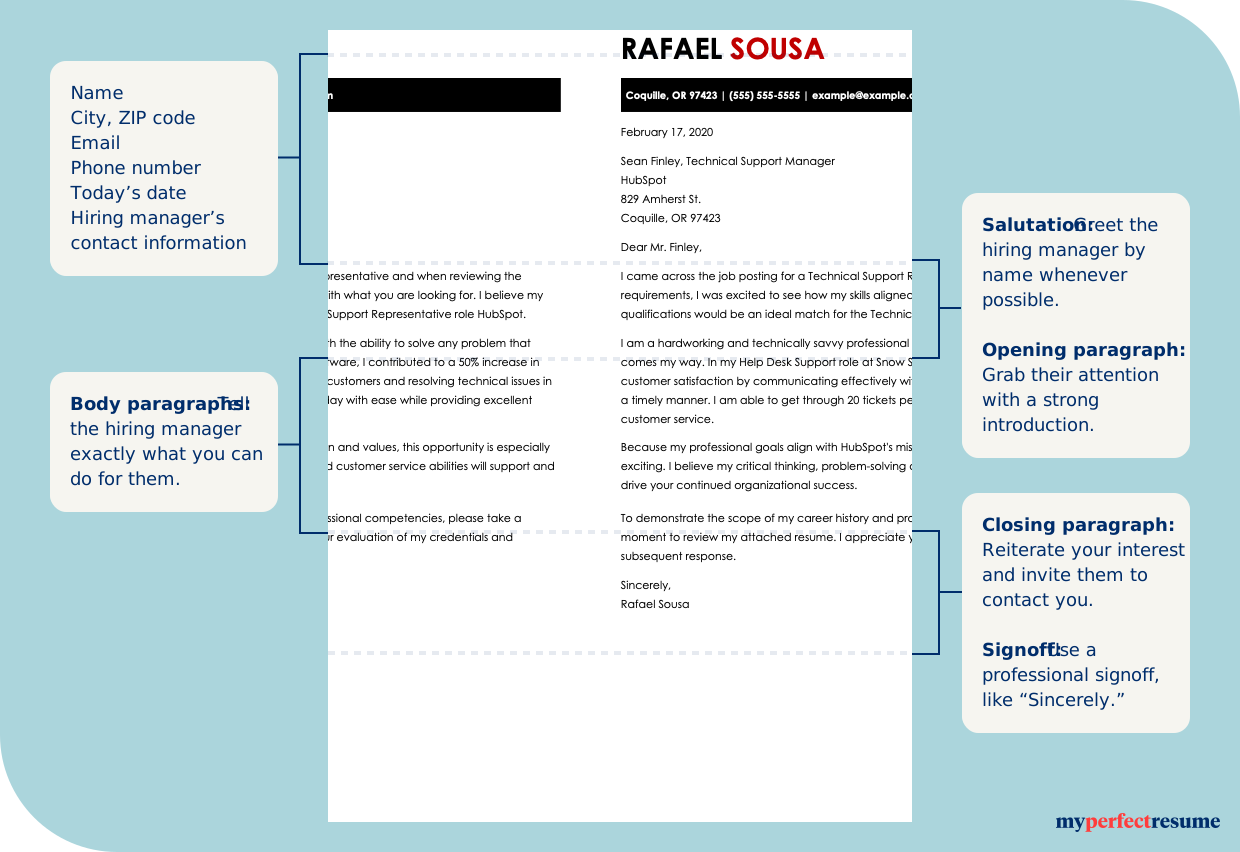
Use a standard business letter structure for your cover letter, including a clear header, concise introduction, focused body paragraphs, and a strong closing. This format reinforces professionalism and helps hiring managers quickly identify your relevant qualifications.
Explore how to format each section of your letter below.
1
Your Contact Information
A proper cover letter format begins with a header that contains your current contact information. Use the same design as your resume header for consistency.
Your cover letter header should include the following information:
- Your full name
- City and state (zip code optional)
- Phone number
- Professional email address
- A link to your portfolio or professional profile, such as Bold.pro
2
Recipient’s Contact Information
Every business letter includes the recipient’s contact information. Your cover letter should include the current date, followed by one to two spaces and the recipient’s contact information:
[Current date]
[Recipient’s first and last name]
[Recipient’s professional title]
[Company name]
[Company’s full address]
3
Salutation
Include a professional, formal salutation one to two spaces below the recipient’s contact information. For example, building on the template above:
April 26, 2026
Ruth Johnson
Director of Human Resources
Static Marketing Solutions
129 Market Street
San Diego, CA 92101
Dear Ruth Johnson,
If you don’t know who to address, it’s acceptable to greet your reader by their title, for example, “Dear Hiring Manager” or “Dear [Department] Team.”
4
Opening Paragraph
Add your opening paragraph one space below the salutation. Your cover letter introduction is your chance to grab the hiring manager’s attention.
Keep it brief—three to four sentences—and make a compelling pitch by expressing your enthusiasm for the role.
To ensure readability, keep your paragraph left-aligned, use concise sentences, and personalize it by mentioning the company name. Here’s an example:
I am a marketing coordinator with five years of experience creating high-impact social media campaigns that drive engagement and revenue growth. When I saw the social media manager opening at Gadgets, Inc., I was excited by the opportunity to contribute to a company whose innovative products and customer-focused approach I deeply admire. At Brightwave Marketing, I led campaigns that increased client engagement by 35% and boosted conversions by 25%, results I am eager to replicate and exceed as part of Gadgets, Inc.’s marketing team.
PRO TIP
When possible, quantify your achievements and goals in your cover letter to clearly show your impact, results, and the value you bring to an employer.
5
Body Paragraphs
After your opening paragraph captures the hiring manager’s attention, the body of your cover letter is where you demonstrate your value.
This section typically includes one to three paragraphs highlighting your most relevant skills, accomplishments, and experience.
Keep your paragraphs concise and focused, ideally three to five sentences each, and use short, clear sentences to maintain readability. Left-align your text and use standard 1-inch margins for a clean, professional appearance. For example:
At Brightwave Marketing, I led a team of four in developing multichannel social media campaigns for clients in the tech and lifestyle sectors. By analyzing engagement metrics and refining content strategies, we boosted a top client’s social media following by 35% and increased lead conversions by 25% over six months. I thrive in environments that require creativity, collaboration, and data-driven decision-making, and I am confident these skills will allow me to contribute immediately to Gadgets, Inc.’s marketing initiatives.
In addition to campaign management, I have extensive experience coordinating cross-department projects and implementing new marketing tools to improve efficiency. For example, I introduced a social media automation platform at Brightwave Marketing that reduced reporting time by 40% and allowed the team to focus on high-impact strategy work. I am eager to bring the same strategic thinking and results-oriented approach to Gadgets, Inc., helping your team grow engagement and drive measurable business outcomes.
PRO TIP
Use strong action verbs to describe your experience and accomplishments. Words like “led,” “developed,” and “improved” make your cover letter dynamic and results-focused.
6
Concluding Paragraph
The concluding paragraph of your cover letter should be concise, confident, and forward-looking. Aim for three to four sentences that briefly reinforce your interest in the role, summarize your value, and invite the employer to take the next step.
Left-align your text, maintain consistent spacing with the rest of your letter, and end with a clear call to action, such as expressing interest in an interview or further discussion. For example:
I am excited about the opportunity to bring my skills and experience to Gadgets, Inc. and contribute to your marketing team’s continued success. I would welcome the chance to discuss how my background aligns with your goals and how I can contribute to the team’s success in this role. Thank you for your time and consideration, and I look forward to hearing from you.
7
Sign-Off
After your concluding paragraph, close your cover letter with a professional sign-off. This section should be simple and consistent with the rest of your formatting.
Use a formal closing, such as “Sincerely,” “Best regards,” or “Kind regards,” followed by a comma. Leave one line of space before typing your name to keep the layout clean and readable.
If you’re submitting a printed letter, include your handwritten signature above your typed name. For digital submissions, a typed name is sufficient. For example:
Sincerely,
[Your Full Name]
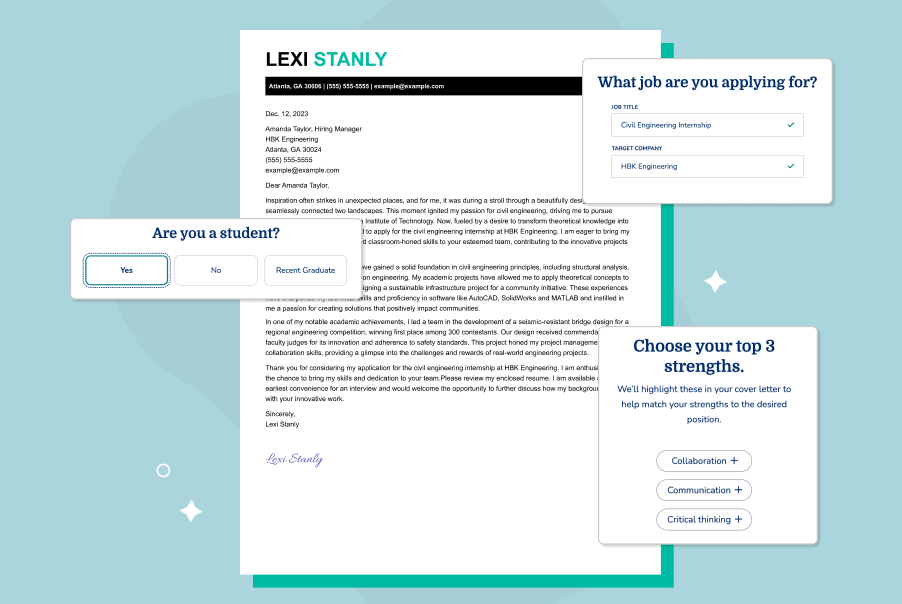
Ready to start writing? Our Cover Letter Generator gives you a leg up by using your resume to create a professional cover letter on a stylish template.


Take the Guesswork Out of Cover Letter Formatting With a Professional Template
A professional cover letter template provides a ready-to-use structure with a clear header, organized sections, and proper spacing. This ensures your content is visually consistent and easy to scan, helping hiring managers focus on your skills and experience.
Our cover letter templates organize your qualifications based on applicant tracking system (ATS) requirements, making it easy to write a professional cover letter in minutes. You can use our Cover Letter Generator to customize your template quickly and easily.

Job-Specific Content
Click or tap to add ready-made content tailored to your experience and target role.

Easy Customization
Write a cover letter for every job application and save as many versions of it as you need.

Step-by-Step Guidance
Get suggestions and tips at every step to help you present your qualifications effectively.

Multiple Download Formats
Save and export your cover letter as a PDF, DOCX, or TXT file format.
How to Format a Cover Letter for an Email
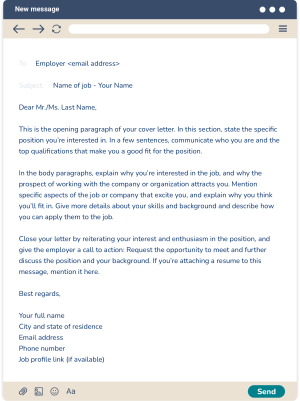
When formatting a cover letter for an email, write a brief subject line, place your letter in the email body, and keep paragraphs short and scannable. Follow the tips below if the job description requires you to send your letter in the body of an email.
1
Write a Professional Subject Line
If the employer doesn’t give you specific instructions for submitting a cover letter, include the position title and your name in the subject line (e.g., Application for [Job Title] – [Your Name]).
2
Start With the Salutation
When you format a cover letter for an email message, you don’t need to include the employer’s mailing address. Skip straight to writing a formal greeting (e.g., “Dear Mike Jones”).
3
Include Your Contact Information at the Bottom
Include your contact information at the bottom of your cover letter by listing your phone number, email address, and LinkedIn profile. This makes it easy for employers to follow up and keeps the email focused on your qualifications and fit for the role.
Place your information underneath your sign-off in this order:
- Your full name
- City and state of residence
- Email address
- Phone number
- Professional profile link
Sample Email Cover Letter Format
Cover Letter Format Examples
We offer an extensive library of cover letter examples across jobs, industries, career levels, and situations, so you can find the best cover letter format for your needs.
Modern Cover Letter Format Example
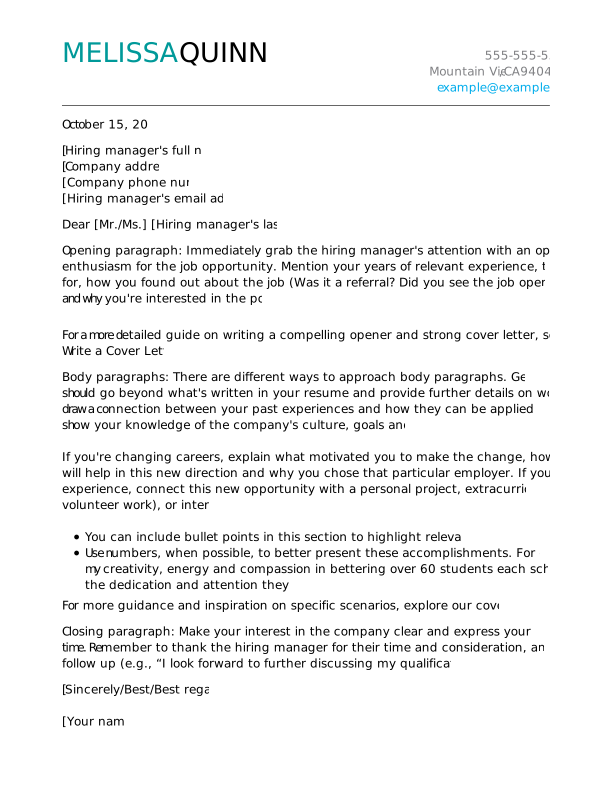
This modern cover letter format is clean and easy to read—designed to help you present yourself as a current, forward-thinking candidate.
Professional Cover Letter Format Example
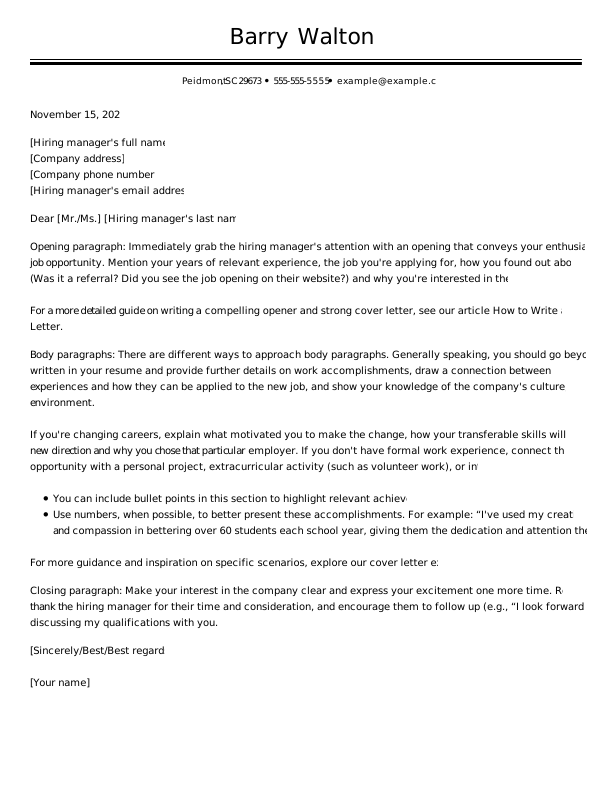
This professional cover letter format is ideal for jobs emphasizing reliability, efficiency, and productivity.
Creative Cover Letter Format Example
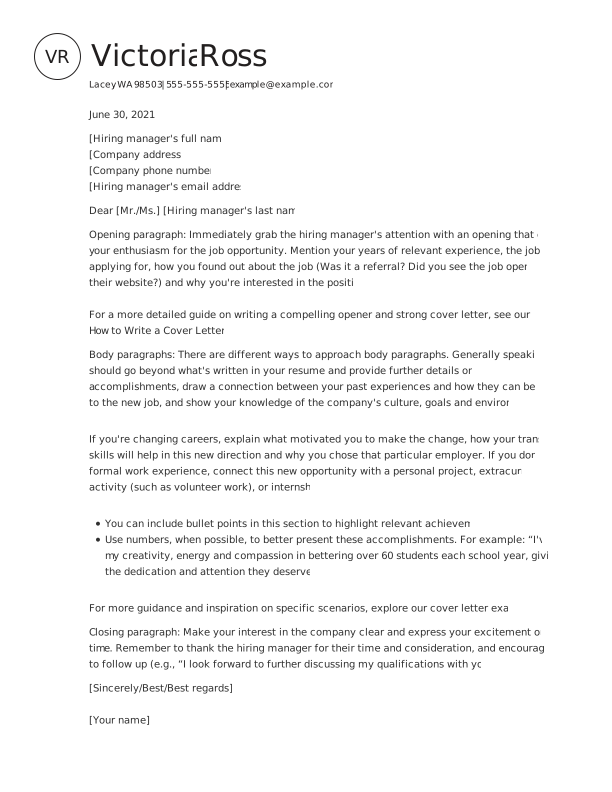
This creative cover letter design helps your cover letter stand out with stylish colors and a monogram-style header.
Simple Cover Letter Format Example
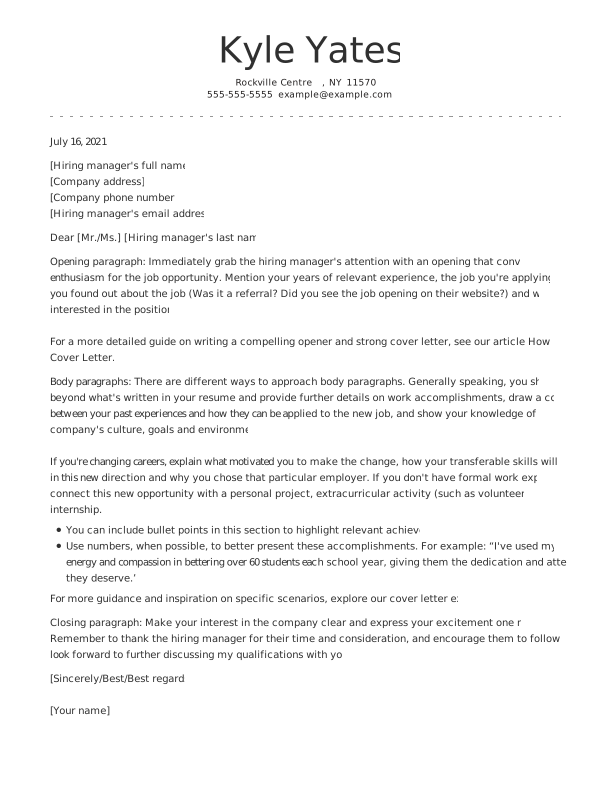
Even a simple design can look effective when your cover letter is organized in a streamlined format, as shown in this example.
Cover Letter Formatting Tips
A strong cover letter prioritizes readability and one-page length, with a clean font, consistent spacing, and clearly defined sections. Follow the cover letter tips below to achieve a professional format.

Margins
Use 1-inch margins on all sides for your cover letter. This keeps your letter clean, professional, and easy to read, while providing sufficient white space to avoid a cramped appearance.

Fonts
Use standard fonts, such as Times New Roman, Helvetica, or Arial, in 12-point size. Unusual fonts can confuse ATS software that employers use to scan job applications.

Spacing
Your cover letter layout should be single-spaced, with a blank line between paragraphs. Use consistent spacing and avoid dense blocks of text, which can be difficult to read.

Alignment
Your text should be left-aligned throughout your cover letter. The one exception to this might be your cover letter header, depending on the template you’re using.

File Format
Unless the employer specifies a preferred format, save and send your cover letter as a PDF. Save your file using your full name. For example: “Your Full Name_Cover Letter.”
PRO TIP
Keep your cover letter between half a page and one page—about 250 to 400 words. This helps your key qualifications stand out while keeping your letter concise and easy to read.
Key Takeaways
Here’s a quick recap to help you write the perfect cover letter and get an interview:
- Cover letters follow a standard business letter format, including a header, salutation, introduction, one to three body paragraphs, conclusion, and sign-off.
- Start with an attention-grabbing opening paragraph that demonstrates your interest in the position and confidence that you’re the best fit.
- Use one to three body paragraphs to explain why you’re interested in the role and highlight the skills you bring.
- End with a concise closing paragraph and a professional sign-off.
- Your cover letter should be about one page long, typically 250 to 400 words.
- Use 1-inch margins and a professional 12-point font for maximum readability.
- A cover letter template makes formatting easy. Customize yours with our Cover Letter Generator, and we’ll handle the formatting for you.
Frequently Asked Questions
Last Updated:
What is a proper format for a cover letter?
A proper format for a cover letter is a one-page business letter that organizes your information logically and makes it easy for hiring managers to scan your qualifications and understand your fit for the role. Here’s what a cover letter should include:
- Your contact information
- Hiring manager’s information
- Professional salutation
- Opening paragraph
- One to three body paragraphs
- Closing paragraph
- Professional sign-off
How long should a good cover letter be?
A good cover letter length is half a page to one page (about 250 to 400 words). This gives you enough space to highlight key qualifications while keeping your message concise and easy for hiring managers to scan. Focus on clear, relevant achievements and avoid repeating your resume to maintain impact and readability.
How do I format my cover letter if I don’t have experience?
If you don’t have experience, format your cover letter with a clear header, strong introduction, and body paragraphs focused on transferable skills, education, and relevant projects instead of work history. Use a simple, professional cover letter format that’s clear and easy to read—ideally half a page to one page with standard fonts, 1-inch margins, and short paragraphs.
What are common cover letter formatting mistakes?
Common cover letter formatting mistakes include using inconsistent fonts or spacing, exceeding one page, skipping key sections, and using large blocks of text without paragraph breaks. Mistakes to avoid when you write your cover letter include:
- Incorrect margins or alignment
- Inconsistent font style, size, or color
- Ignoring white space
- Irregular spacing between lines and paragraphs
- Not matching your resume’s formatting
What font style and size should I use for a cover letter?
The best font style and size for a cover letter is a clean, professional font like Arial, Calibri, or Times New Roman in 10- to 12-point size.
Simple, readable fonts make your letter easy to scan on both screen and print, helping hiring managers quickly absorb your qualifications without distraction. For a cohesive application, use the same font as your resume.
Can I use bullet points in a cover letter?
Yes, you can use bullet points in a cover letter to highlight key achievements or skills in a clear, scannable way. Bullet points help break up text, emphasize results, and make your most relevant qualifications easier to identify quickly.
Limit bullet points to three and keep your letter primarily in a narrative format so it still reads like a professional introduction rather than a resume.
What is the rule of three in a cover letter?
The rule of three in a cover letter focuses on answering three key questions:
- Why are you qualified?
- Why do you want the role?
- Why are you interested in the company?
Addressing these questions creates a clear, persuasive narrative that aligns your skills and motivation with the job, helping hiring managers quickly understand your fit and intent.
What five things should a cover letter include?
A cover letter should include five key elements that ensure clarity and impact:
- A professional header with your contact details
- A personalized greeting addressing the hiring manager
- An engaging opening that states your intent and value
- Specific examples of relevant skills and achievements
- A strong closing with a clear call to action
These elements create a structured, persuasive flow that makes your qualifications easy to follow and helps employers quickly understand your fit for the role.