
CV Templates for 2026
 CREATE ON ANY DEVICE
  AI TOOL
Choose a CV template and add tailored content written by career experts. Download in the file format you need and apply—easy on desktop and mobile.
Template Name


Resources for Customizing Your CV Template
 CV Maker
 How to Write a CV
 CV Examples
 CV vs Resume
How to Choose the Right CV Format
The right CV format depends on your experience, career stage, and the type of role you’re applying for. Choose a format that highlights your strongest qualifications while keeping your career story easy to follow.
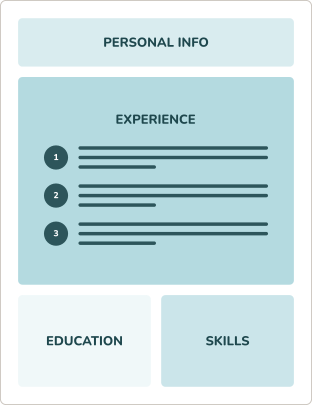
CHRONOLOGICAL CV FORMAT
Highlights your work history, research, and publications in reverse-chronological order, which is ideal for showcasing steady career growth.
RECOMMENDED
- You have consistent career progression in your current industry.
- You’ve built a professional career within a single field of expertise.
- You’re applying for a role that’s similar to your current position.
COMBINATION CV FORMAT
Balances your skills and employment history to showcase diverse qualifications, making it an excellent format for career changers and freelancers.
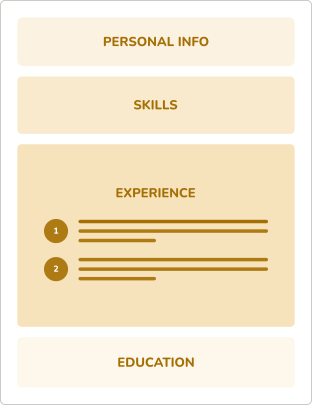
- You’re changing to a new field and need to highlight transferable skills.
- You have freelance or varied work experience that you want to showcase.
- You’re applying for a mid-level role that values diverse qualifications.
FUNCTIONAL CV FORMAT
Emphasizes skills and expertise over work history, making it useful for some career changers, recent graduates, or candidates with limited relevant experience.
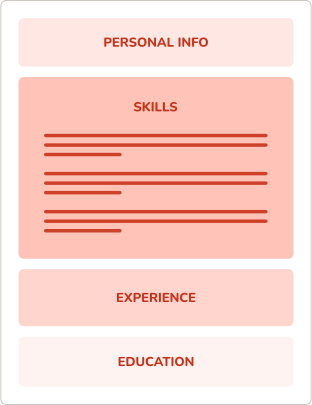
- You’re a recent graduate with limited professional experience to highlight.
- You have gaps in your work history and want to focus on other areas.
- You’re applying for an entry-level role that emphasizes skills over experience.
CV Formatting Tips for Every Template
Our CV templates are professionally designed and customizable to reflect your personal style. Follow these tips to tailor your curriculum vitae template and maintain a clean, polished look.


Margins
Keep margins between 0.5 inches and 1 inch on all sides. This ensures your CV looks clean, fits neatly on two or more pages, and is easy for applicant tracking systems (ATS) to parse.
Font Size
Use an easy-to-read font like Arial, Calibri, or Times New Roman. Keep your body text around 10–12 points for readability, and use a larger font size for your name and section headings to create a clear hierarchy.
Bullet Points
Use nondecorative bullet points to list achievements or responsibilities. Start each bullet with a strong action verb and maintain consistency in formatting and punctuation.
Spacing
Include spacing between sections and bullets to make your CV easy to scan. Use single spacing within sections and one to two lines between sections for clarity.
Get Hired Fast With MyPerfectResume’s
CV Templates

Designed by Professionals
Our CV templates are professionally designed to meet industry standards with clear, organized, and visually appealing layouts that stand out to hiring managers.

Easy to Customize
Easily customize the design and add as many sections to your CV as you need to highlight the skills, experience, and education that matter most in your field.

ATS-Friendly Layouts
Our CV templates follow ATS-friendly formatting best practices to help applicant tracking systems process your information accurately and improve your chances of getting noticed by recruiters.

Expert CV-Building Tools
Use our CV Maker to build your CV quickly with step-by-step guidance, effortless customization, and job-specific content suggestions.
Search Professionally Written
Resume Examples
Easily tailor our resume examples using MyPerfectResume’s online Resume Builder.
Search Professionally Written
Cover Letter Examples
Our cover letter examples highlight the ideal tone and skills employers seek.
Search Professionally Written
CV Examples
Personalize our CV examples with MyPerfectResume’s free Resume Builder.
Get Started Creating a Job-Winning CV
Frequently Asked Questions
Last Updated:
What is the best template for a CV?
The best template for a CV uses a clean, professional layout that highlights your key qualifications, experience, and education in a clear, easy-to-read format. MyPerfectResume offers high-quality CV templates for various experience levels, industries, and roles.
Choose a structure with well-defined sections, consistent fonts, and sufficient white space, and prioritize simplicity over design flair so hiring managers can quickly find your information.
Where can I get a CV template for free?
You can get a CV template for free on this page. Choose a template that catches your eye, click “Edit this template,” customize the content with our builder, and download your free CV template in plain text (TXT) format. We also offer premium plans to download our CV templates in Word or PDF format and access additional job application tools.
How do I customize my CV template?
To customize your CV template, start by replacing placeholder text with your personal information, work experience, education, and skills. Adjust section order to emphasize your strongest qualifications, and tailor content to match the job description.
You can also modify fonts, colors, and spacing to reflect your professional style while keeping the layout clean and easy to read.
Are your CV templates ATS-friendly?
Yes, our CV templates are ATS-friendly, meaning they’re designed to be easily read by applicant tracking systems (ATS). They use simple layouts, standard fonts, and clear headings so your skills and experience can be accurately parsed. This helps improve the chances that your CV reaches a human recruiter while maintaining a professional appearance.
What is the difference between a resume and a CV?
The difference between a resume and a CV is their length, purpose, and level of detail. A resume is a summary of your skills, experience, and achievements tailored to a specific job, while a CV provides a more detailed overview of your academic background, research, publications, and professional experience. CVs are often used for academic, research, or international roles.
What is the most modern CV format?
The most modern CV format is a clean, structured layout that highlights your skills, experience, and achievements while remaining easy to read. The reverse-chronological CV format is the most widely used option today, as it places your most recent work experience first and allows employers to see your career progression and latest accomplishments.
This format includes clear sections for your professional summary, work history, education, and skills, with concise bullet points and a professional design.
How long should a CV typically be?
A CV should be as long as needed to showcase your qualifications, experience, and achievements. A CV can be longer than a resume because it includes detailed academic, research, publication, or professional information. Academic CVs may span multiple pages, while industry CVs are usually more concise.
How far back should a CV go?
A CV should include as much relevant experience as needed to demonstrate your qualifications. For academic and research roles, this may include your full career history, while industry CVs should prioritize recent and relevant experience.
Is a CV best in PDF or Word?
A CV is usually best submitted as a PDF unless an employer specifically requests a Word document. PDFs preserve formatting, while Word files may be preferred when recruiters need to edit or process your application.
What is the most common CV mistake?
The most common CV mistake is including too much irrelevant information instead of focusing on the qualifications and experience that matter most for the role. A strong CV should be tailored to the position, use clear formatting, and highlight relevant skills and achievements.
Other common mistakes include outdated layouts, unclear job descriptions, spelling errors, and failing to show measurable results from previous experience.
