Our customers have been hired at: *Foot Note


Table of Contents
Get started with MyPerfectResume today!
- Build a resume on any device
- Pick an ATS-friendly template
- Tailor with AI copy suggestions
What to Expect
- A two-column resume organizes your information into two vertical sections, often separating supporting details from your work experience.
- Two-column resumes can help you use space efficiently while creating a clear visual hierarchy between sections.
- Two-column resumes can work across industries, but the best format depends on the role, application process, and employer expectations.
- ATS-friendly two-column resumes use simple formatting, standard headings, and readable fonts to keep information easy to process.
A two-column resume is an excellent layout for showcasing your skills and qualifications in a visually appealing way. In this guide, we’ll provide two-column resume templates, cover the pros and cons of this format, and share tips for creating an effective, ATS-friendly, two-column resume.
Two-Column Resume Templates
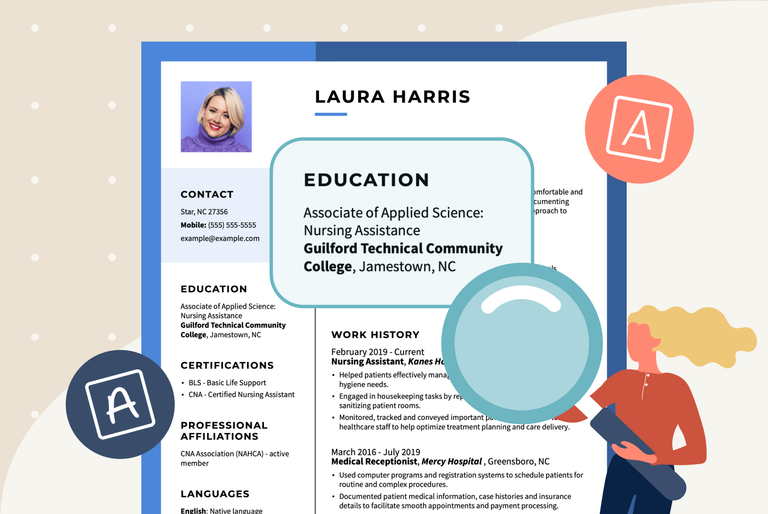
A two-column resume template organizes your information into two side-by-side sections, making it easier to separate details such as skills, education, and contact information from your work experience. This layout saves space and creates a clear visual hierarchy.
Explore two-column professional resume templates for different jobs below:
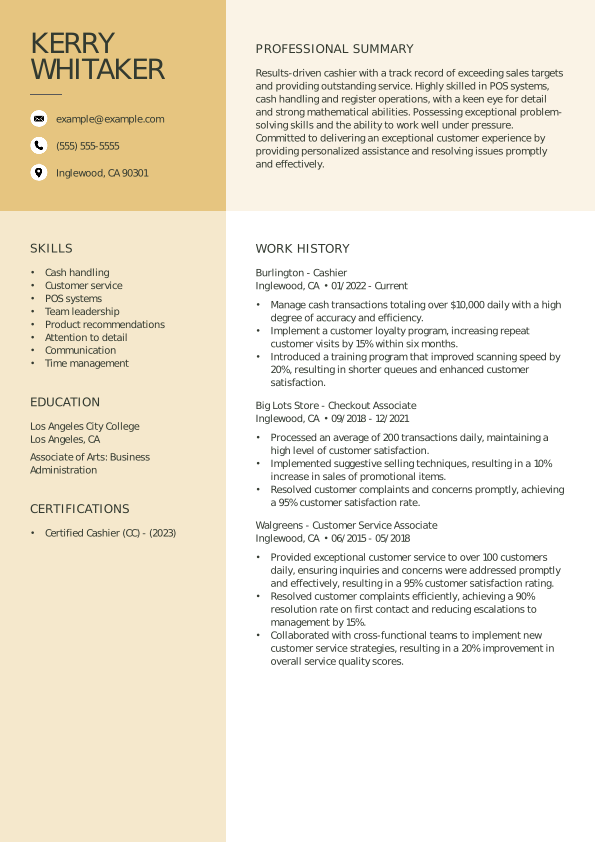
Two-Column Cashier Resume
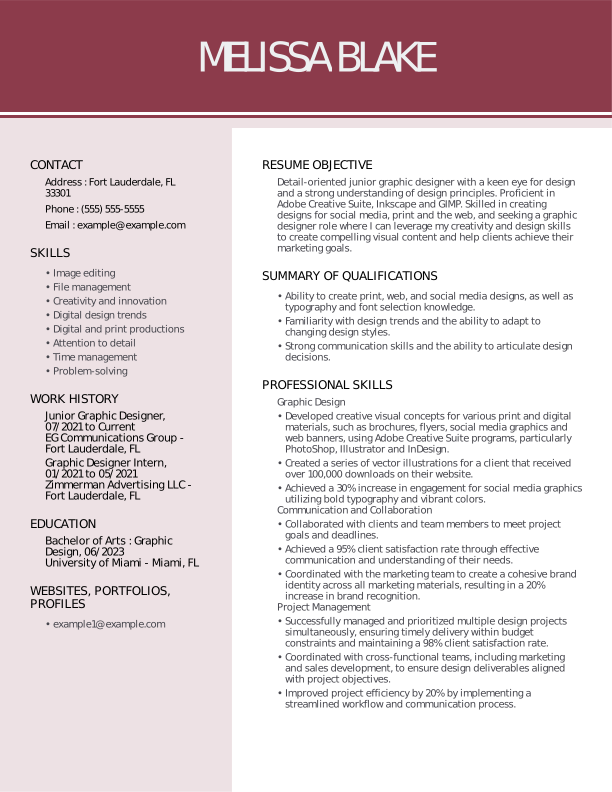
Two-Column Graphic Designer Resume
Two-Column Social Worker Resume

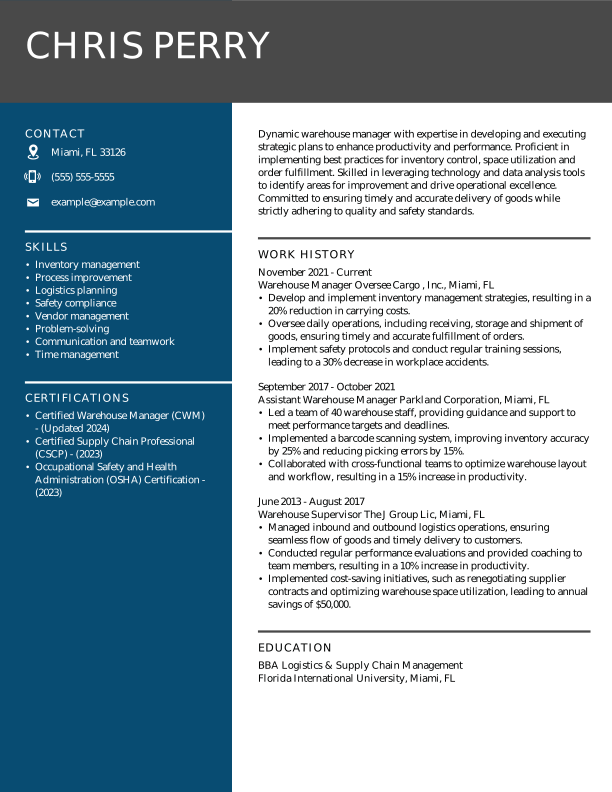
Two-Column Warehouse Worker Resume
What Is a Two-Column Resume Format?
A two-column resume format divides your resume content into two vertical sections, usually placing contact information, skills, or education in one column and work experience in the other.
This layout helps organize information and use space efficiently while keeping the structure simple so recruiters and applicant tracking systems (ATS) can read your resume correctly.
One-Column vs Two-Column Resumes
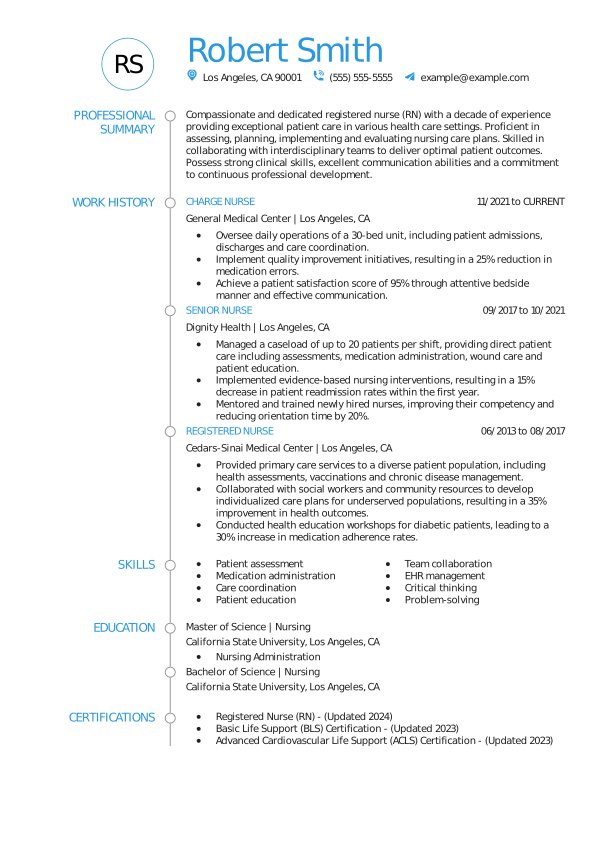
A one-column resume is a traditional format in which your content appears in a single column from top to bottom. In this layout, sections such as contact information, work experience, education, and skills appear in a linear flow without columns or text boxes.
Here’s an example of a standard one-column resume:
Should a Resume Be One or Two Columns?
A resume can use either one or two columns, depending on your experience, industry, and preferred layout. One-column resumes offer a straightforward reading flow, while two-column resumes use space efficiently and organize information into distinct sections. Both can work when the formatting is clear and easy to read.
Here are a few considerations to keep in mind when deciding between these two layouts:
- Amount of information: If you have a lot of information to include in your resume, a two-column format can organize it more effectively and make it easier to read. If you have less information to include, however, a one-column format is likely sufficient.
- Industry norms: Different industries may have different expectations for resume formats. For example, creative industries such as graphic design or advertising may prefer a more visually appealing two-column format, while traditional industries such as finance or law may prefer a simpler one-column format.
- Applicant tracking systems: Some ATS may not read two-column resumes correctly, which could affect how they process your information during initial screening. If ATS compatibility is a priority, consider a simple one-column format or keep your two-column layout simple and easy to parse.
- Personal preferences: Ultimately, deciding between a one-column or two-column resume may come down to personal preference and what you feel best represents your skills and experience.
Pros & Cons of Two-Column Resumes
Two-column resumes can make it easier to organize information and fit more content into a limited space, but they can also create formatting challenges. Understanding the benefits and drawbacks can help you decide whether a two-column layout fits your experience, industry, and the types of jobs you’re applying for.
Pros of Two-Column Resumes
Two-column resumes help you organize information into distinct sections while using available space efficiently. They can create a clear visual hierarchy and make it easier for employers to find relevant information at a glance.
- Enhanced readability: Two columns can make your resume easier to read by using space more efficiently. With information neatly organized into distinct sections, hiring managers can easily find relevant details.
- Clear section separation: The two-column format clearly separates your work experience, education section, and skills. This helps employers quickly find the information they need, making it more likely they will find relevant qualifications and measurable accomplishments.
- Visual appeal: Two-column resumes often look more visually appealing compared to traditional single-column formats. The balanced layout can make the resume stand out and leave a positive impression on the reader.
- Emphasis on key points: Two columns let you selectively highlight key points or professional accomplishments. By placing important information in one column and additional details in the other, you can draw attention to the most relevant and impactful aspects of your experience.
- Differentiation from other candidates: Two-column resumes can help you stand out from the competition by presenting your information in a unique and visually engaging way. This can positively impact hiring managers, who often review numerous resumes.
Cons of Two-Column Resumes
Two-column resumes can be more difficult to format and may not work as well with some ATS platforms. Complex layouts, text boxes, tables, or columns that interrupt the reading order can make information harder to process, so keep the design simple and well organized.
- Compatibility with ATS systems: Some ATS software may struggle to scan two-column resumes, resulting in lost details or incorrect categorization. This can impact your chances of getting through the initial screening process.
- Limited space for content: The two-column format may limit the amount of space available for content, depending on the template you select. This can be challenging for candidates with extensive work experience or multiple achievements to highlight.
- Distraction from content: While a visually appealing resume can make a positive impression, overusing design elements can distract and reduce the focus on the content.
- Difficulty in printing: Some employers may prefer to print resumes for review, and the two-column format may not always print correctly or may require additional formatting adjustments to fit on a single page.
- Not suitable for all industries: While the two-column format can work well for creative or design-related industries, it may not suit more traditional or conservative industries. In these cases, a more traditional, single-column format may be more appropriate.
How to Make a Two-Column Resume on Different Platforms
The process for crafting a two-column resume varies depending on how you build it. We’ll walk through creating a two-column resume with a resume builder, Microsoft Word, and Google Docs.
Creating a Two-Column Resume With a Resume Builder
To create a two-column resume with a resume builder, choose a template, enter your professional information, customize the design, and download your completed resume.
Here’s how to create a two-column resume with MyPerfectResume’s AI Resume Builder:
- Choose a two-column template. Select a professionally designed two-column template that fits your experience and preferred resume format.
- Enter your information. Add your work history, skills, education, and other relevant sections. You can change colors or switch templates without losing your information.
- Review and download. Check your completed resume, make any final edits, and download it in the file format you need. You can return later to update it or tailor it to another job.
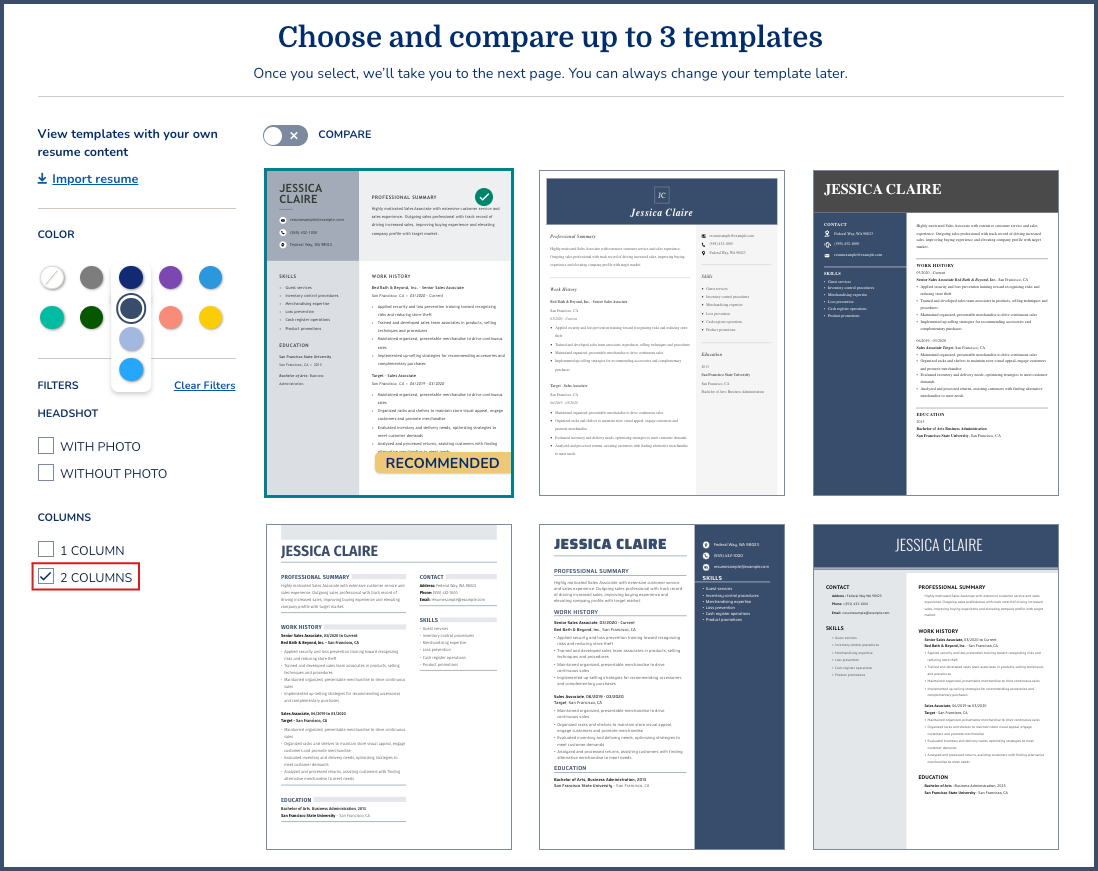
You can filter our professional resume templates by one or two columns and change your template color to match your preferences:
Creating a Two-Column Resume With Microsoft Word
You can create a two-column resume in Microsoft Word by using a two-column Word resume template or manually dividing your resume into columns. Start with a simple layout, add your resume sections, and adjust the spacing and alignment to keep your information organized.
Here are the steps for creating a two-column resume with Microsoft Word:
- Choose a template or create columns. Select a two-column resume template in Word, or use the Layout > Columns option to divide a blank document into two sections.
- Add your resume sections. Enter your contact information, summary, work experience, skills, education, and other relevant sections. Place shorter sections, such as skills or certifications, in the narrower column.
- Format and review your resume. Use consistent headings, spacing, and fonts throughout. Check that your content flows in the intended order and that both columns are aligned properly.
- Save and download your resume. Save your resume as a Word document or export it as a PDF, depending on the application instructions.
Creating a Two-Column Resume With Google Docs
You can create a two-column resume in Google Docs by using a template or setting up a two-column layout manually. A simple structure can help you organize your information while keeping the resume easy to read.
Here’s how to create a two-column resume in Google Docs:
- Choose a template or create columns. Select a resume template from the Google Docs template gallery, or use Format > Columns > Two to create a two-column layout.
- Add your resume sections. Enter your contact information, summary, work experience, skills, education, and other relevant sections. Keep related information together and use clear headings to make each section easy to scan.
- Format and review your resume. Adjust the column spacing, margins, fonts, and alignment so the layout remains clean and readable. Check that your content appears in the intended order.
- Download your resume. When you’re finished, use File > Download to save your resume as a PDF or another file type the job application supports.
If you want to skip the formatting work, explore our professionally designed Google Docs resume templates. Choose a two-column layout and customize the template with your information.
Expert Tips for Two-Column Resumes
Two-column resumes work best when the layout makes your qualifications easy to scan without distracting from your experience. Keep the design simple, organize sections logically, and use consistent formatting throughout.
The following tips can help you create a polished two-column resume that presents your skills and experience clearly:
Tips for Tailoring Your Resume to the Job Description
Tailor your two-column resume to each job by highlighting the skills, experience, and qualifications that match the job description. Use relevant keywords naturally throughout your resume, especially in your summary, skills, and work experience sections.
Here are a few key tips to keep in mind:
- Read the job description carefully. To customize your resume, start by reading the job description carefully and highlighting the key skills, qualifications, and experience the employer is looking for. This will help you identify which elements of your background and experience to emphasize.
- Customize your professional summary. Begin with a professional summary that clearly highlights how your skills and experience align with the job requirements. This will help grab the employer’s attention and make your resume stand out.
- Use keywords. Incorporate relevant keywords throughout your resume. This makes it easier for employers and ATS to match your qualifications to the job.
- Highlight relevant experience. Focus on highlighting the most relevant experience to the job you are applying for. Use bullet points with strong action verbs to describe your accomplishments that align with the job requirements.
Tips for Using Design Elements Strategically
Use design elements strategically to improve the readability and organization of your two-column resume without distracting from your qualifications. Choose a simple color scheme, consistent fonts, and clear section headings to create visual hierarchy. Keep decorative elements minimal so your skills and experience stay the focus.
Here are a few key tips to keep in mind:
- Include clear headings. Use clear headings in both columns to guide the reader’s eye and make it easy to find information.
- Use white space. Use white space effectively to break up the text and reduce clutter by using narrower columns or adding margins between sections.
- Use minimalistic visual elements. Use visuals such as icons, charts, or graphs sparingly to highlight important information or add visual interest without compromising readability.
- Focus on alignment. Align headings, text, and bullet points to create a sense of balance and structure in the resume. This can make your resume look more organized and professional.
Tips for an ATS-Friendly Resume
Keep your two-column resume simple and easy for ATS to process. Use standard section headings, readable fonts, and relevant keywords from the job description. Avoid overly complex graphics, text boxes, and decorative elements that can interfere with how the resume is parsed.
Here are a few key tips to keep in mind:
- Use a simple and clean design. Avoid complex tables, images, or graphics that may confuse the ATS. Instead, use a simple and clean design with clear headings and bullet points.
- Keep the formatting consistent. Ensure that the formatting is consistent throughout the document, including your resume font and spacing.
- Make important information easy to parse. Keep contact information and keywords clearly organized, and avoid complex column structures that could interfere with ATS parsing.
- Test your resume. Check how the resume looks as a PDF, review its readability, and use an ATS resume checker to identify potential formatting or keyword issues that could affect how your information is parsed.
Key Takeaways
- Choose a two-column layout to organize skills, education, and other supporting details alongside your work experience.
- Match your resume layout to the role by considering your industry, position type, and the information you need to highlight.
- Keep design elements simple by using consistent fonts, clear headings, and minimal graphics to maintain readability and ATS compatibility.
- Tailor your resume to each job description by highlighting relevant skills, experience, and keywords throughout your two-column resume.
- Test your resume before submitting it to check its formatting, readability, and ATS compatibility.
Frequently Asked Questions
Is it okay to have a two-column resume?
Yes, it’s okay to have a two-column resume as long as the layout is clear, organized, and easy to read. Two-column resumes can help you use space efficiently and separate information such as skills and education from your work experience. Keep the design simple, use standard headings and readable fonts, and avoid complex elements that could affect ATS compatibility.
Can ATS read two-column resumes?
Yes, many ATS tools can read two-column resumes, but compatibility varies by software and formatting. To improve compatibility, use clear section headings, standard fonts, and simple columns, and avoid text boxes, graphics, and other complex design elements that can interfere with parsing.
Which resume sections should go in each column of a two-column resume?
In a two-column resume, place your work experience and professional summary in the wider column, and use the narrower column for skills, education, certifications, and contact information. This structure gives your most detailed experience room to stand out while keeping supporting qualifications easy to find and scan.
How much space should each column take on a resume?
A two-column resume typically works well when the main column takes up about two-thirds of the page, and the narrower column takes up about one-third. Use the wider column for detailed sections like work experience, and the narrower column for skills, education, certifications, and contact information.
Do recruiters prefer one-column or two-column resumes?
Recruiter preferences for one-column versus two-column resumes vary by industry, role, and individual hiring practices. One-column resumes provide a straightforward reading flow, while two-column resumes can organize information efficiently and create a clear visual hierarchy. Whichever format you choose, prioritize readability, relevant content, and a layout that makes your qualifications easy to find.
How We Reviewed This Article
Since 2012, we have helped more than 11 million job seekers. We want to make your career journey accessible and manageable through our services and Career Center’s how-to guides and tips. In our commitment to bring you a transparent process, we present our Editorial Process.
Rate this article
Two-Column Resume Templates


Elizabeth is a Certified Professional Resume Writer (CPRW) and a member of the Professional Association of Resume Writers & Career Coaches. She is committed to helping job seekers navigate the job market and succeed in their careers.
More Articles by Elizabeth Muenzen, CPRWShare this page
 Add MyPerfectResume as a preferred source on Google
Add
Our customers have been hired at:*Foot Note