Our customers have been hired at: *Foot Note


Table of Contents
Get started with MyPerfectResume today!
- Build a resume on any device
- Pick an ATS-friendly template
- Tailor with AI copy suggestions
In today’s competitive job market, hiring managers often sift through dozens of applications for a single position. To stand out, you’ll need a clear, concise, and visually appealing resume.
But what does a good resume look like? From formatting tips to content layout best practices, this guide will cover what a professional resume should look like to impress recruiters and win interviews.
What Should a Resume Look Like?
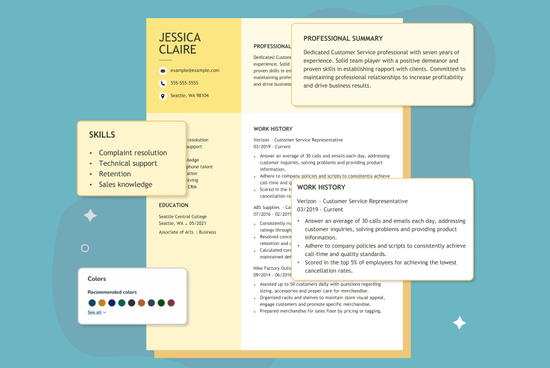
Simplicity is key in modern resume design. Rather than relying on complex design elements to catch the recruiter’s eye, opt for a polished layout that lets your skills and qualifications shine.
Explore our library of professional resume examples tailored to various jobs, industries, and experience levels to see how a resume in your field looks.
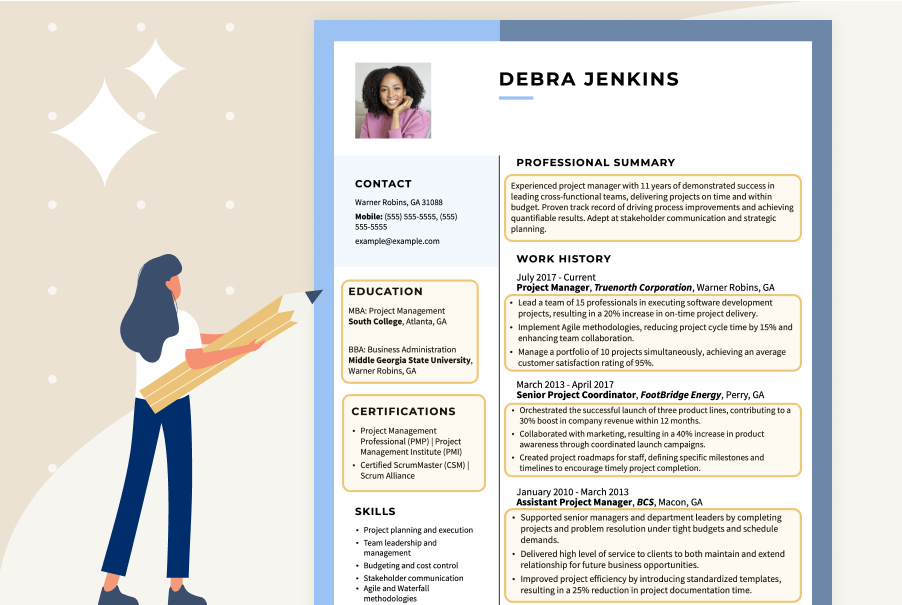
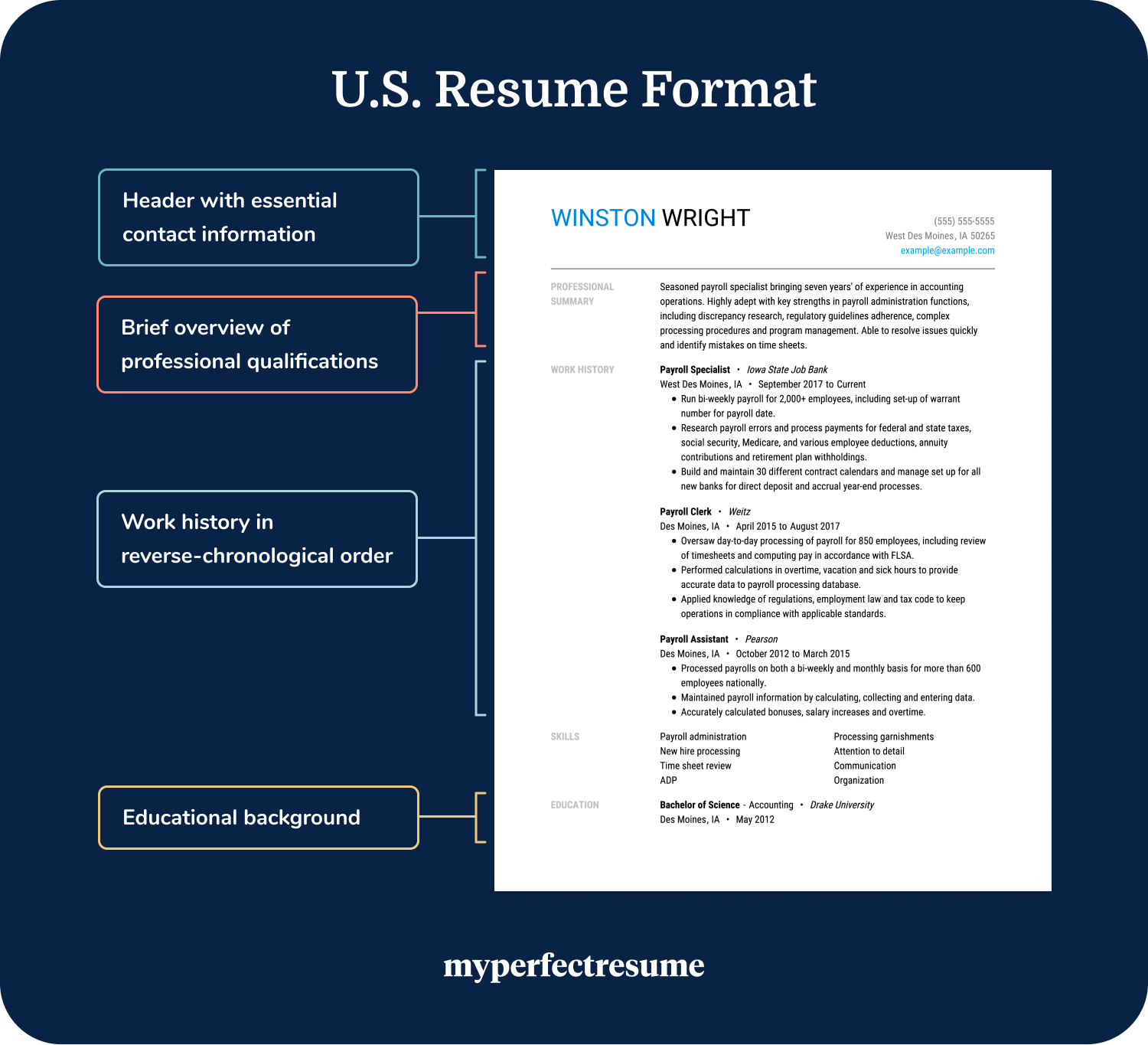
The example layout below showcases what a resume should look like:
Formatting Best Practices
Our career advice professionals outlined expert tips for designing and formatting a resume that effectively showcases your skills, experience, and qualifications.
1. Make Your Header Clear & Readable
Your resume header should be bold, clear, and easy to read, ensuring your name and contact information stand out at a glance so that hiring managers can contact you for an interview.
Use a professional font, slightly larger than the body text, and keep the layout clean with adequate spacing. Avoid unnecessary embellishments—clarity and professionalism are key.

You can use our Resume Builder to create a resume with a clear and bold header that demonstrates your professionalism and attention to detail.
2. Use a Professional Font
Choose a modern, readable font for your resume, such as Arial, Calibri, Helvetica, Courier, or Times New Roman. Avoid using outdated or overly decorative fonts like Broadway, Magneto, or Comic Sans.
One of the primary goals when writing a resume is to make the document easy to read. You accomplish this by using a classic, clean font.
To simplify this process, you can customize one of our resume templates in our Resume Builder, where you’ll have a variety of professional, recruiter-approved fonts to choose from.
3. Incorporate Color Strategically
While adding color to your resume can make it stand out, it’s important to use it sparingly and strategically. Avoid using colors and combinations that will hinder its readability.
Limit your resume to one or two colors and apply them consistently throughout the document.
If you’re in a creative industry, you might have more leeway to use color and design. Check out our creative resume templates for some inspiration or help.
4. Balance Text With Whitespace
Using white space effectively in your resume enhances readability and creates a clean, professional look. It also makes it easier for recruiters to quickly find key information.
Adequate spacing between sections, margins, and bullet points helps guide the reader’s eye and prevents your resume from looking cluttered. For example:

5. Maintain Consistent Formatting
Maintaining consistent formatting in your resume ensures a polished, professional appearance. Use the same font, spacing, and bullet style throughout to enhance readability and organization.
Clear organization is particularly important for your resume’s work history section, which should be uniform so that hiring managers can easily see what makes you a great fit for the role.
Once you’ve added your past work experience and packed each entry full of resume keywords and skills from the job description, double-check that your formatting is consistent.
Start by ensuring that each entry lists the company name, location, and dates of employment in the same order. Next, check that your bullet points are aligned and that your margins line up.
Content Layout Best Practices
In addition to ensuring a clean and polished layout, your resume content should be structured to effectively present your qualifications. Browse the best practices below to get started.
1. Simplify Your Contact Information
To simplify your contact information on your resume, include only the essentials. Add your name, phone number, email address, and professional networking profile if relevant.
Avoid unnecessary details like full mailing addresses, multiple phone numbers, or personal social media links. These can add visual clutter to your resume.
For a consistent and polished application, ensure that your cover letter header includes the same information listed in your resume header.
2. Shorten Your Professional Summary
A professional summary sits at the top of your resume beneath your header. Its purpose is to offer recruiters a quick snapshot of your experience and qualifications.
Summaries should be short—no longer than three to five sentences. The idea is to draw the reader in and encourage them to continue reading the rest of your resume.
A well-written professional summary succinctly explains what you’ll bring to the table if you are hired. Here is an effective example:
3. Tailor Your Skills Section to the Job
Always aim to incorporate the skills emphasized in the job description. Include hard skills, such as software or technical expertise, and soft skills, such as communication or time management.
According to an eye-tracking study conducted by Ladders, recruiters spend an average of six seconds reviewing an individual’s resume.
Candidates have just seconds to make a strong first impression and convince a recruiter to delve deeper into their qualifications.
Including a bulleted list of highly relevant skills at the top of your resume draws the recruiter’s eye to the key qualifications that make you a great fit.
4. Condense Your Information to One Page
A one-page resume is ideal for ensuring a clear, impactful presentation of your qualifications.
To condense your resume to one page, focus on relevant experience, use concise bullet points, and eliminate unnecessary details.
Prioritize key achievements over job descriptions, use a clean layout with strategic white space, and adjust font size and margins without sacrificing readability.
A two-page resume is acceptable if you have more than 10 years of highly relevant experience. If you use two pages, ensure that the entire second page is filled for a professional layout.
5. Check for Spelling & Grammar Errors
Even if your resume looks polished and professional, typos and grammatical errors can undermine the benefits of a visually engaging layout.
Read your resume twice or even three times, then send it to a friend for proofreading. A fresh set of eyes will quickly find mistakes you didn’t see.
We recommend scanning your resume with our free ATS Resume Checker to receive instant feedback on opportunities for improvement.
Examples of What a Good Resume Looks Like
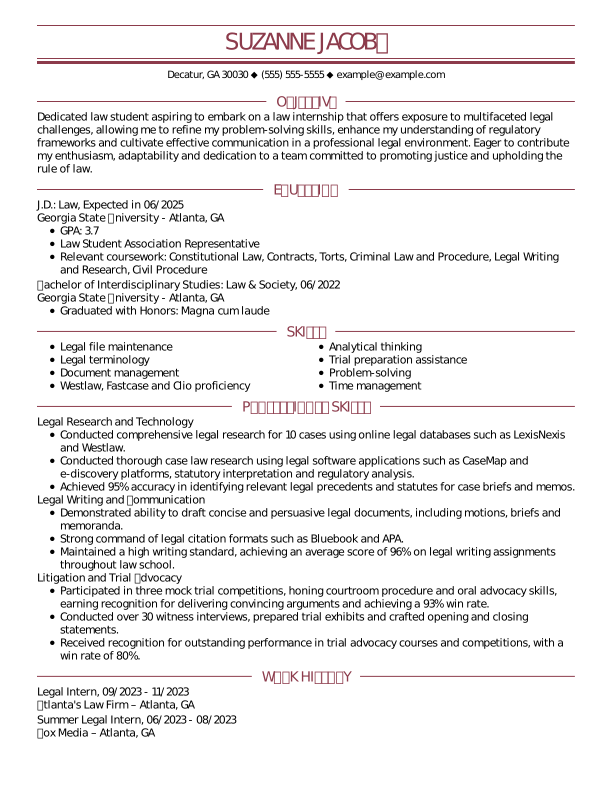
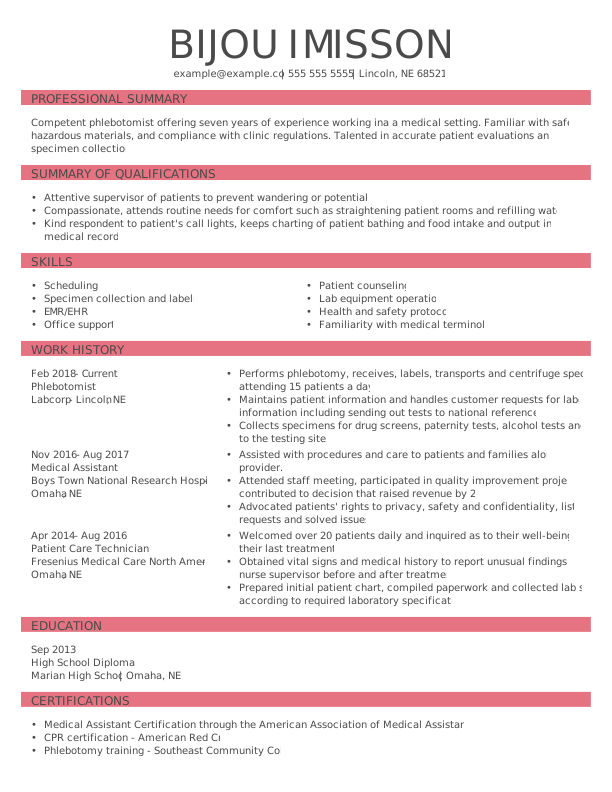
The following resume examples demonstrate how to apply the formatting and content best practices above to each of the three primary resume formats—chronological, functional, and combination.
Chronological
Functional
Combination
Key Takeaways
- Keep it clean and professional. Use a simple, well-structured layout that highlights your skills and experience without unnecessary distractions.
- Use a clear and readable header. Ensure your name and contact information stand out with a bold, easy-to-read format.
- Use white space effectively. Avoid clutter by incorporating adequate margins and spacing between sections for better readability.
- Maintain consistent formatting. Use a uniform font, spacing, and bullet style to create a polished, professional appearance.
- Focus on relevant content. Tailor your resume to the job by emphasizing key skills, achievements, and experience that align with the role.
- Keep it concise. Aim for a one-page resume by eliminating redundant information and prioritizing the most impactful details.
- Proofread it for errors: Typos and inconsistencies can make a bad impression, so carefully review your resume before submitting it.
FAQ
What does a proper resume look like?
A proper resume is a clear, well-organized document that highlights your most relevant skills and achievements. It should use a clean layout, simple fonts, consistent formatting, and standard section headings to look polished and professional.
Employers scan resumes quickly, so clarity and concise, results-focused bullet points help them quickly see your value and fit for the role.
What does a mobile-friendly resume look like?
With more employers using mobile devices to review resumes, it’s important to optimize your resume for mobile viewing by avoiding complex designs, graphics, and unusual fonts.
Use a clean format with clear, standard headings and choose easy-to-read fonts like Arial, Calibri, or Verdana, avoiding small or decorative styles. Save your resume as a PDF or Word document to ensure it opens and displays correctly on any device.
How should a resume look to stand out?
A standout resume should look well-organized, easy to read, and visually appealing. To stand out, your resume needs a tidy design with concise, relevant information. Ensure you:
- Start with a clear summary highlighting your top achievements and experience.
- Include a skills section that showcases relevant technical skills and strengths.
- Use white space, bullet points, and clear headings for readability.
- Customize your resume for each role to match the job requirements.
What does a resume look like for a first job?
A resume for your first job should be clean and simple, highlighting your skills, education, and relevant experience, such as internships or volunteer work. Here are a few tips:
- Add an objective statement that highlights your career goals and transferable skills.
- Use a clean and simple design with balanced white space and a legible font.
- Focus on your education and any relevant extracurricular activities or volunteer work.
What does an ATS-friendly resume look like?
An ATS-friendly resume is designed to be easily parsed by applicant tracking systems (ATS) used by employers to screen resumes. Here’s what it should look like:
- Avoid images, tables, and graphics, and use simple text with bullet points.
- Use specific job titles and skills to reflect your experience and qualifications.
- Stick to standard section headings like “Work Experience” and “Skills.”
Using a simple format increases your chances of passing initial screening and standing out.
What’s the proper format for a resume?
The proper format for a resume is clear, organized, and tailored to your experience. The most common formats are chronological (focuses on work history), functional (emphasizes skills), and combination (highlights both work history and skills).
Use consistent headings, readable fonts, concise bullet points for achievements, and a clean layout so employers can quickly scan your qualifications. Choose the format that best showcases your most relevant experience for the role.
How long should my resume be?
The ideal resume length is one to two pages, depending on your experience level and industry norms. For most professionals, condensing key qualifications into a concise, one-page resume is crucial to keeping the reader engaged and highlighting relevant skills.
If you have extensive experience, you can extend your resume to a second page, but always prioritize quality over quantity and ensure that you fill the entire second page.
What should a resume include?
A resume should include your contact information, a professional summary, work experience with achievement-focused bullet points, skills, and education.
Include relevant technical and soft skills, certifications, and any accomplishments that demonstrate your qualifications. Optional sections like awards, volunteer work, or projects can be added if they strengthen your fit for the role.
Review our guide on what to put on a resume to learn how to stand out to recruiters and hiring managers in your field.
How should I handle employment gaps on my resume?
Address employment gaps on your resume honestly and confidently. If the gap was longer than 6 to 12 months, offer a concise explanation, such as family responsibilities, education, or career exploration. Focus on skills or accomplishments gained during that time, and be prepared to explain any gaps in interviews.
Consider using a functional or combination resume format. These formats emphasize relevant skills over traditional work history.
What does a professional resume look like?
A professional resume looks clean, well-organized, and easy to read, presenting your experience and skills clearly. It uses a simple, readable font, consistent formatting, and standard sections such as “Contact Information,” “Skills,” and “Work Experience.”
Use bullet points to highlight achievements with measurable results, and avoid cluttering the layout with graphics or excessive colors so employers can quickly scan your qualifications.
How often should I update my resume?
You should update your resume regularly, ideally every few months or whenever you gain new skills, experience, or achievements. Even if you’re not actively job hunting, keeping your resume current ensures it’s ready when opportunities arise.
Updating frequently also helps you accurately track accomplishments, certifications, promotions, or projects, so nothing important is forgotten when you need it most.
How we reviewed this article
Since 2012, we have helped more than 11 million job seekers. We want to make your career journey accessible and manageable through our services and Career Center’s how-to guides and tips. In our commitment to bring you a transparent process, we present our Editorial Process.
Rate this article
What Does a Good Resume Look Like?


Elizabeth is a Certified Professional Resume Writer (CPRW) and a member of the Professional Association of Resume Writers & Career Coaches. She is committed to helping job seekers navigate the job market and succeed in their careers.
More Articles by Elizabeth Muenzen, CPRWShare this page
 Add MyPerfectResume as a preferred source on Google
Add
Our customers have been hired at:*Foot Note