Table of Contents
Get started with MyPerfectResume today!
- Build a resume on any device
- Pick an ATS-friendly template
- Tailor with AI copy suggestions
Why this resume works
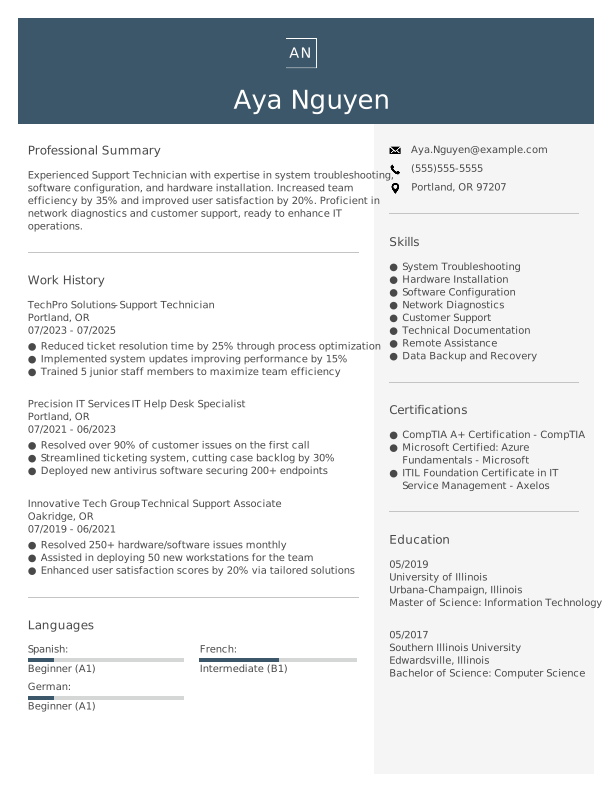
- Quantifies accomplishments: The applicant’s measurable accomplishments, like reducing ticket resolution time by 25%, showcase their value and impact.
- Highlights industry-specific skills: Skills such as system troubleshooting and network diagnostics highlight the applicant’s fit for IT roles, emphasizing their readiness to tackle industry-specific challenges efficiently.
- Uses action-oriented language: Using dynamic action verbs like “reduced” and “streamlined,” the applicant conveys initiative and effectiveness.
More Support Technician Resume Examples
Our support technician resume examples highlight your troubleshooting, technical support, and customer service skills. Use these information technology resume samples to build a strong resume showcasing your expertise and experience in the tech support field.
Entry-Level Support Technician
Why this resume works
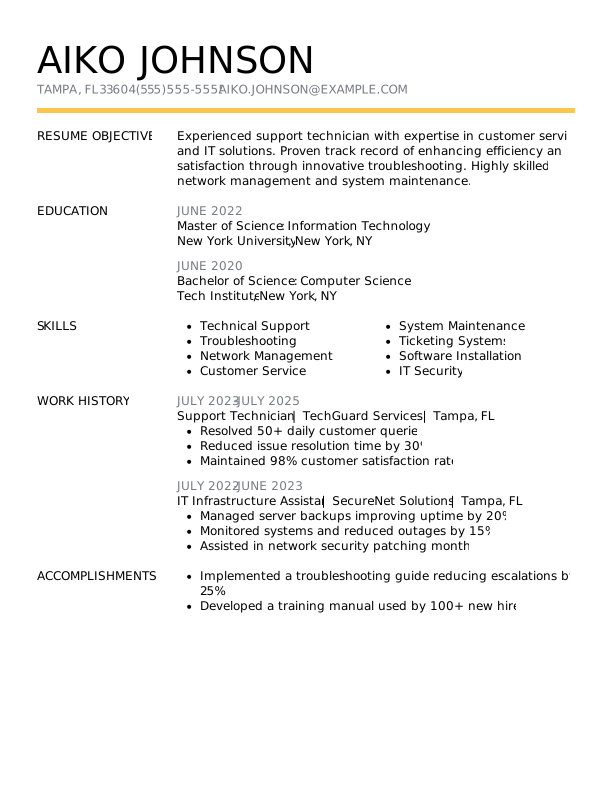
- Puts skills at the forefront: The skills-based resume format emphasizes the applicant’s technical support and IT security expertise, ideal for those starting their careers.
- Effective use of keywords: Keywords like “technical support” and “network management” are seamlessly integrated to boost ATS compatibility.
- Shows digital literacy: The resume incorporates diverse tools such as ticketing systems and network management, reflecting strong computer skills and digital literacy.
Mid-Level Support Technician
Why this resume works
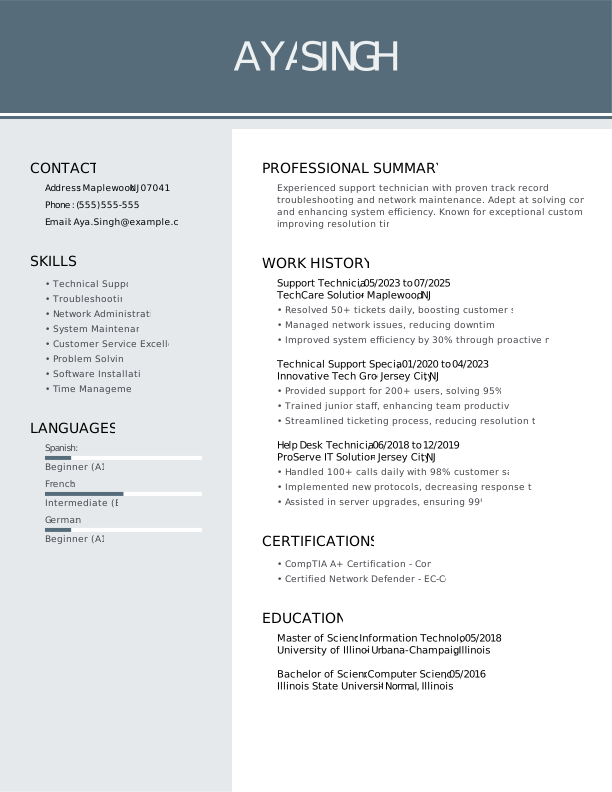
- Points to measurable outcomes: By cutting downtime by 40% and improving system efficiency by 30%, the applicant effectively showcases their contribution to operational excellence.
- Displays technical expertise: The applicant’s certifications in CompTIA A+ and Cisco highlight a robust foundation in technical skills, essential for skilled technical support roles.
- Includes a mix of soft and hard skills: Handling over 100 calls daily while ensuring high satisfaction demonstrates the applicant’s balance of interpersonal skills alongside technical expertise.
Experienced Support Technician
Why this resume works
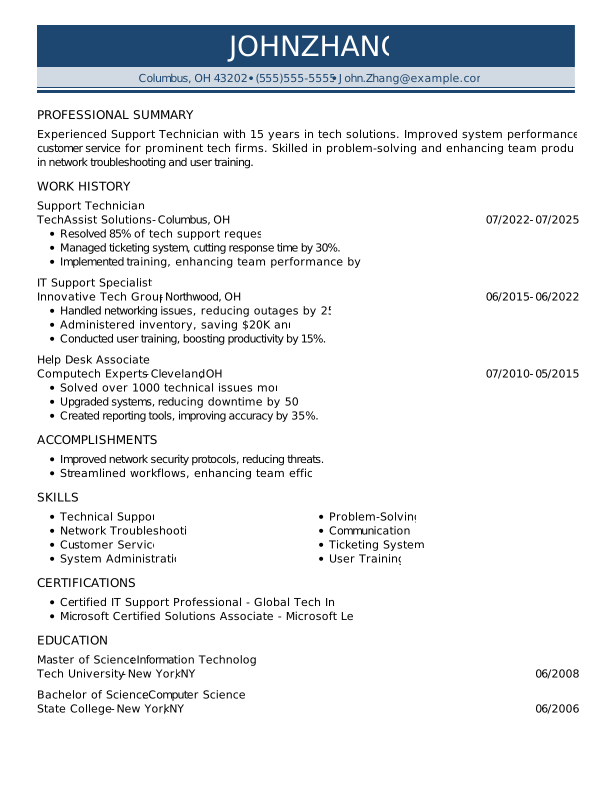
- Focuses on work history: Using a chronological resume format, the applicant effectively organizes extensive experience across tech roles, showcasing steady career progression and impactful contributions to system improvements and team efficiency.
- Emphasizes leadership skills: The applicant’s focus on leading training initiatives and optimizing workflows aligns with key leadership skills, further demonstrated by their ability to improve team productivity by up to 40%.
- Lists relevant certifications: Certifications like Certified IT Support Professional and Microsoft Certified Solutions Associate reinforce technical expertise and dedication to staying updated in the field.
Support Technician Resume Template (Text Version)
Make things easy with the text below. For options you can download, explore our resume templates.
Aya Nguyen
Portland, OR 97207
(555)555-5555
Aya.Nguyen@example.com
Professional Summary
Experienced Support Technician with expertise in system troubleshooting, software configuration, and hardware installation. Increased team efficiency by 35% and improved user satisfaction by 20%. Proficient in network diagnostics and customer support, ready to enhance IT operations.
Work History
Support Technician
TechPro Solutions – Portland, OR
July 2023 – July 2025
- Reduced ticket resolution time by 25% through process optimization
- Implemented system updates improving performance by 15%
- Trained 5 junior staff members to maximize team efficiency
IT Help Desk Specialist
Precision IT Services – Portland, OR
July 2021 – June 2023
- Resolved over 90% of customer issues on the first call
- Streamlined ticketing system, cutting case backlog by 30%
- Deployed new antivirus software securing 200+ endpoints
Technical Support Associate
Innovative Tech Group – Oakridge, OR
July 2019 – June 2021
- Resolved 250+ hardware/software issues monthly
- Assisted in deploying 50 new workstations for the team
- Enhanced user satisfaction scores by 20% via tailored solutions
Languages
- Spanish – Beginner (A1)
- French – Intermediate (B1)
- German – Beginner (A1)
Skills
- System Troubleshooting
- Hardware Installation
- Software Configuration
- Network Diagnostics
- Customer Support
- Technical Documentation
- Remote Assistance
- Data Backup and Recovery
Certifications
- CompTIA A+ Certification – CompTIA
- Microsoft Certified: Azure Fundamentals – Microsoft
- ITIL Foundation Certificate in IT Service Management – Axelos
Education
Master of Science Information Technology
University of Illinois Urbana-Champaign, Illinois
May 2019
Bachelor of Science Computer Science
Southern Illinois University Edwardsville, Illinois
May 2017
Related Resume Guides
Advice for Writing Your Support Technician Resume
Explore our advice section on how to write a resume tailored to a support technician role. Discover how to highlight your tech skills, problem-solving abilities, and knack for customer service.
Highlight relevant technical skills
For a support technician role, having a strong set of technical skills is key to solving problems and assisting users effectively. To highlight these abilities, create a dedicated skills section on your resume or weave them into your work experience details.
Focus on tools, software, and technologies directly related to the job. For example, mention experience with troubleshooting hardware issues, network configuration, operating systems like Windows or Linux, and ticketing systems such as Jira or ServiceNow.
Employers often look for hands-on knowledge of system diagnostics and repair techniques, along with familiarity in areas like VPN setup, remote desktop support tools, and basic scripting languages like Python or PowerShell.
Include skills like installing or upgrading software applications and working with cloud platforms such as Microsoft Azure or AWS, if applicable. Be sure to also note your ability to handle common peripherals like printers and scanners.
When listing technical skills, use clear terms that match the job description so hiring managers can quickly see you’re a good fit. Show how you’ve used them in prior roles to solve real-world problems. Tailoring your technical expertise to align with the specific needs of a support technician role will make your resume stand out.
Example of a technical skills section
- Operating systems (Windows, macOS, Linux)
- Remote support tools (TeamViewer, AnyDesk, LogMeIn)
- Network troubleshooting & configuration
- Hardware diagnostics & repair
- Ticketing systems (Zendesk, Jira, Freshdesk)
- Virtualization software (VMware, Hyper-V)
- Basic scripting for automation tasks
- Cloud services support (AWS, Azure)
Build a standout resume in minutes with our easy-to-use Resume Builder. Choose a professional template, add your details, and make a strong impression on employers.
Quantify your accomplishments
Quantifying accomplishments in your resume makes it stand out by showing the impact of your work instead of just listing tasks. For a support technician role, turning duties into measurable achievements makes it clear how you’ve added value to past employers.
Hiring managers are drawn to resumes that showcase specific results because they give insight into your skills and problem-solving abilities. Metrics such as percentages, cost savings, or efficiency improvements help tell a compelling story about your contributions.
In the work experience section, every entry should start with the job title, employer name, location, and employment dates. From there, focus on transforming responsibilities into achievements using action verbs and numbers. For example, instead of saying “provided technical support,” say “resolved 95% of support tickets within 24 hours.”
This approach highlights results and demonstrates expertise in handling challenges effectively. By weaving these measurable outcomes throughout your experience section, you create a dynamic and impactful resume. Using metrics allows hiring managers to quickly assess what you bring to the table.
Numbers make accomplishments tangible and easier to evaluate compared to vague descriptions of duties. A results-driven resume not only grabs attention but also positions you as someone who delivers meaningful outcomes—critical for roles like support technician, where performance directly impacts success.
5 support technician work history bullet points
- Resolved over 150 technical support tickets monthly, improving customer satisfaction scores by 25%.
- Implemented a new ticketing system that decreased response time by 40% and increased team productivity.
- Trained and mentored a team of 10 junior technicians, resulting in a 30% decrease in escalated issues.
- Collaborated with the IT department to upgrade network hardware, reducing connectivity issues by 50%.
- Developed a troubleshooting guide that reduced average call handling time from 15 minutes to under 7 minutes.
Check out our professional resume examples to find easy-to-follow templates that can help you create a standout resume for any job.
Write a powerful professional summary
A professional summary on a resume serves as an introduction for hiring managers, providing a snapshot of your skills and qualifications. You can decide whether to use a summary or a resume objective based on your experience level and career goals.
A professional summary is typically three to four sentences long and highlights your experience, skills, and achievements. It works well for experienced applicants who want to showcase their professional identity and the value they bring to the role. For example, if you’re applying for a support technician position, your summary should focus on your technical expertise and problem-solving abilities.
On the other hand, resume objectives are career goal statements that suit entry-level applicants, career changers, or those with gaps in employment. While summaries emphasize “what I’ve accomplished,” objectives focus more on “what I aim to contribute.”
Next, we will share examples of both summaries and objectives crafted for various industries and levels of experience so you can create your impactful resume introduction.
Support technician resume summary examples
Entry-level
Recent graduate with an associate degree in information technology and a CompTIA A+ certification. Skilled in troubleshooting hardware and software issues, setting up workstations, and providing basic technical support. Eager to apply foundational knowledge in IT support to assist end users and contribute to efficient system operations.
Mid-career
Experienced support technician with 5+ years of expertise in diagnosing and resolving technical problems across diverse operating systems and networks. Proficient in managing help desk operations, performing system upgrades, and training end users on new technologies. Recognized for strong problem-solving skills, quick response times, and dedication to maintaining seamless IT functionality.
Experienced
Senior support technician with over a decade of experience in enterprise-level IT environments. Specialized in network administration, cybersecurity protocols, and advanced troubleshooting for complex technical challenges. Proven track record of leading IT teams, optimizing infrastructure performance, and implementing cost-effective solutions that improve organizational productivity.
Support technician resume objective examples
Entry-level
Detail-oriented support technician with hands-on training in troubleshooting and system maintenance, eager to begin a career in IT. Looking to contribute problem-solving skills and technical knowledge to improve user experience and ensure efficient operations within a forward-thinking organization.
Career changer
Driven professional transitioning into the field of technical support, equipped with strong communication abilities and a keen interest in technology. Aiming to leverage customer service experience and tech-savvy skills to assist users effectively while growing within a collaborative IT environment.
Recent graduate
Enthusiastic computer science graduate seeking an entry-level support technician role. Passionate about applying academic knowledge of network systems and software troubleshooting to help maintain smooth technological operations and improve client satisfaction in an innovative company.
Pick a resume template with a simple design, clear headings, and plenty of white space to help employers focus on your skills, work experience, and achievements.
Showcase your credentials
Listing credentials such as certifications, licenses, and specialized training is important for a support technician because it shows you have the right skills and knowledge. In technical fields, these credentials can set you apart from others.
It’s a good idea to create a dedicated certifications section on your resume to highlight these achievements. This section can be an addition to your education part, making your qualifications easy to find. Here are a few examples of certifications for your resume:
- CompTIA A+
- CompTIA Network+
- CompTIA Security+
- Microsoft Certified: Modern Desktop Administrator Associate
- HDI Desktop Support Technician (DST)
- Apple Certified Support Professional (ACSP)
- Cisco Certified Support Technician (CCST)
These certifications show that you’re ready for the challenges of being a support technician. They prove you know how to handle different technologies and solutions effectively. By having them listed on your resume, you’ll look more prepared and attractive to employers in the tech industry.
Example of a certifications section
CompTIA A+ Certification
Issued by: CompTIA
Issued 2023
Microsoft Certified: Azure Fundamentals
Issued by: Microsoft
Expires 2025
Cisco Certified Technician (CCT)
Issued by: Cisco Systems
Issued 2022
Apple Certified Support Professional (ACSP)
Issued by: Apple Inc.
Issued 2021
Certified Information Systems Security Professional (CISSP)
Issued by: (ISC)²
Expires 2024
Use a polished and professional resume format that aligns with your experience level to ensure your skills and qualifications stand out to hiring managers.
FAQ
Do I need to include a cover letter with my support technician resume?
Yes, including a cover letter with your support technician resume is beneficial and can increase your chances of landing an interview.
A cover letter offers you the opportunity to highlight your technical skills and explain why you’re interested in the specific company or role, beyond the information on your resume.
If the company uses specific technology or software systems that you are familiar with, mentioning this can demonstrate your suitability for the position.
Consider using our Cover Letter Generator to craft a personalized letter that complements your resume, focusing on areas where you’ve excelled in troubleshooting or customer service.
Additionally, explore cover letter examples tailored for IT and technical roles to get ideas on effectively presenting yourself as an ideal applicant.
How long should a support technician’s resume be?
For a support technician, a one-page resume is generally best. This format allows you to focus on key skills like troubleshooting, customer service expertise, and familiarity with various operating systems or software. By keeping it concise, you ensure that hiring managers quickly see your most relevant experiences.
If you’ve gained extensive experience or have specialized certifications that add value to your application, expanding to a two-page resume can be appropriate. Just make sure every detail counts and directly relates to the role.
To find further guidance, explore tips on how long a resume should be based on your career stage.
How do you write a support technician resume with no experience?
If you have no formal experience as a support technician, highlight your skills, relevant coursework, and any practical experience that shows your capability. Check out these tips to craft an effective resume with no experience:
- Emphasize technical skills: List any IT-related skills you possess, such as troubleshooting, software installation, or network management. If you’ve worked with specific tools or systems like Windows or Linux, include those as well.
- Include relevant education and certifications: Mention your degree if it’s related to IT or computer science. Certifications like CompTIA A+, Network+, or other IT credentials can also be valuable to showcase.
- Highlight hands-on experience: Any volunteer work, personal projects, internships, or freelance jobs where you’ve applied tech skills should be noted. Describe what you did and how it relates to support tasks.
- Showcase soft skills: Effective communication and problem-solving are key in a support role. Provide examples of experiences where you’ve demonstrated these abilities.
Remember to tailor each section of your resume to the role you are applying for to stand out to hiring managers and recruiters.
Rate this article
Support Technician


Toni is a Certified Professional Resume Writer (CPRW) and member of the Professional Association of Resume Writers & Career Coaches. She is committed to helping job seekers navigate the job market and succeed in their careers.
More Articles by Toni Frana, CPRWShare this page
 Add MyPerfectResume as a preferred source on Google
Add